
BASIC IT SKILLS BOOT CAMP
Build essential computer skills through practical training—enroll today and gain the confidence to work smarter in the digital world!
📚 Course Curriculum
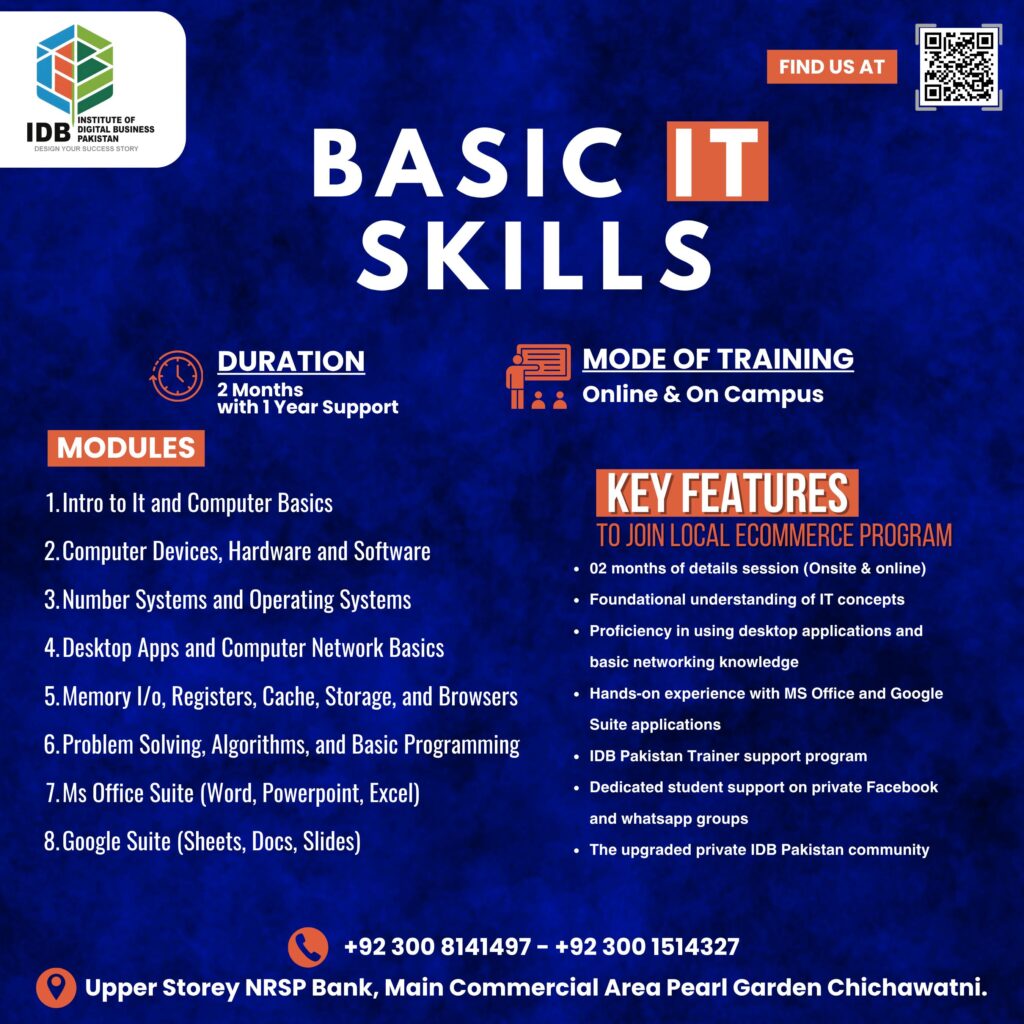
- 8 Modules
- 52 Lessons
(MODULE 1) INTRO TO IT AND COMPUTER BASICS
- Definition and scope of IT
- Role of IT in modern society
- Overview of IT infrastructure
- Understanding computer components
- Types of computers
- Basic computer operations
( MODULE 2 ) COMPUTER DEVICES, HARDWARE AND SOFTWARE
- Input and output devices
- Storage devices
- Internal components (CPU, memory, etc.)
- Types of software (system software, application software)
- Software installation and management
- Overview of common operating systems
( MODULE 3 ) CONTENT CREATION & BRANDING WITH AI BRANDING
- Binary, decimal, hexadecimal systems
- Converting between number systems
- Application of number systems in computing
- Functions of an operating system
- Popular operating systems (Windows, macOS, Linux)
- Basic OS operations and file management
( MODULE 4 ) DESKTOP APPS AND COMPUTER NETWORK BASICS
- Overview of common desktop applications
- Introduction to word processing, spreadsheets, and presentations
- Basic features and functions
- Types of networks (LAN, WAN, etc.)
- Network components (routers, switches, etc.)
- Basics of internet connectivity
( MODULE 5 ) MEMORY I/O, REGISTERS, CACHE, STORAGE, AND BROWSERS
- Types of memory (RAM, ROM, etc.)
- Understanding registers and cache
- Storage devices and hierarchy
- Popular internet browsers
- Browser settings and security
- Effective web browsing techniques
( MODULE 6 ) PROBLEM SOLVING, ALGORITHMS, AND BASIC PROGRAMMING
- Steps in problem-solving
- Basic concepts of algorithms
- Writing simple algorithms
- Introduction to programming languages
- Writing and executing simple programs
- Debugging and error handling
( MODULE 7 ) MS OFFICE SUITE (WORD, POWERPOINT, EXCEL)
- Basic and advanced features of MS Word
- Creating and formatting documents
- Introduction to MS PowerPoint
- Creating presentations with animations and transitions
- Basic and advanced features of MS Excel
- Working with formulas and functions
- Creating charts and graphs
( MODULE 8 ) GOOGLE SUITE (SHEETS, DOCS, SLIDES)
- Introduction to Google Docs
- Collaboration features in Google Docs
- Introduction to Google Slides
- Creating presentations with Google Slides
- Basic and advanced features of Google Sheets
- Using formulas and functions
- Data visualization in Google Sheets
PKR 25,000
PKR 40,000
- ✓ 1 Month Free COP
- ✓ Lifetime Support
- ✓ Certificate of completion
Benefits to Join Boot Camp
- ✓ 02 months of details session (Onsite & online)
- ✓ Foundational understanding of IT concepts
- ✓ Proficiency in using desktop applications and basic networking knowledge
- ✓ Hands-on experience with MS Office and Google Suite applications
- ✓ IDB Pakistan Trainer support program
- ✓ Dedicated student support on private Facebook and whatsapp groups


Award Winning
Excellence

Trusted by
Thousands

Lifetime
Support

Real World
Results